
When you try to open an MS Word file 2007/2010/2013/2016/2019, Office 365 o SharePoint, you may receive the following error message:
"Word experienced an error trying to open the file. Try the following suggestions “
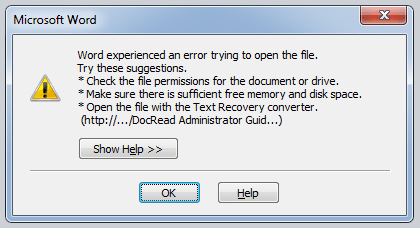
If you get the above error message, it means it is locked and cannot open the file. There are many reasons behind this problem, but luckily there are absolute solutions available to fix this problem. Here, in this article, I will tell you the reason and the solution methods for this problem.
Cause and solution
Cause 1: Mostly, this error occurs when system files are missing, corrupted registry entries, outdated drivers and software and if there is any malware on your PC.
Solution: You should use the advanced system repair tool to repair all these areas with one click. By cleaning and speeding up the PC with the System Optimizer tool, most likely you will not face any problem when you open MS Word file.
Cause 2: This problem mainly occurs when the file was altered by third party software during the transmission process. When you download the Word file from the Internet, FTP or mail, most likely you will face the same error.
Solution 1: Download the file again if you have downloaded it from the internet.
Solution 2: Unlock the Word file
1. The right button of the mouse in the Word file that has the problems and clicks Property.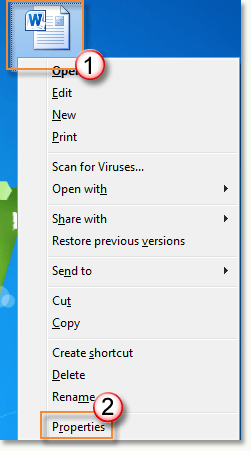
2. Ir General Tab and click Clear button.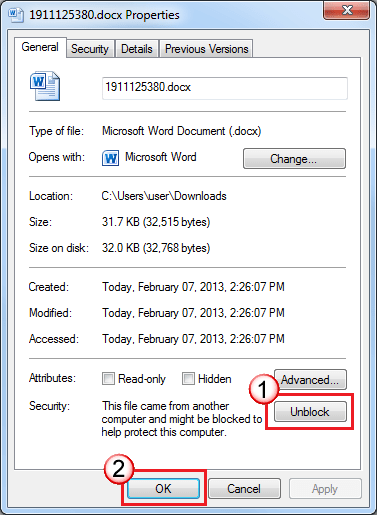
3. Click on Apply for Y OK.
Solution 3: Move the Word file to the trusted folder
1. Create a new folder Y move everyone problem word file in this folder.
2. Abra MS Word 2007/2010 or any version and go to File> Option.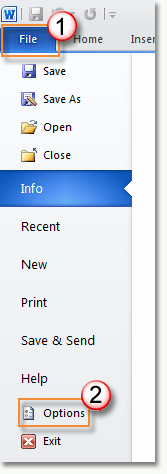
3. Click on Trust Center menu on the left sidebar. Thereafter, click on Trust Center Settings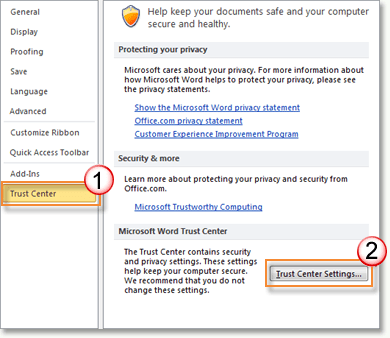
4. Click on Trusted location in the left sidebar and then click Add new location button.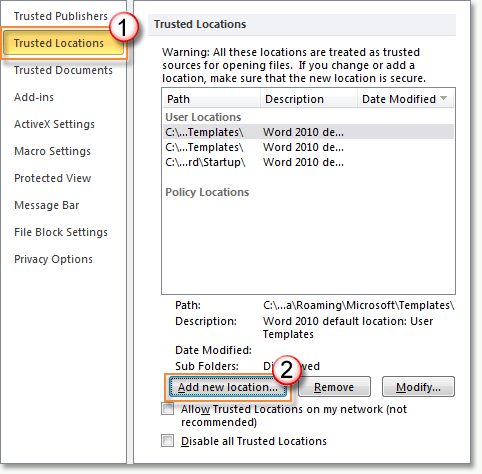
5. Select the folder containing all the problematic Word file and click OK and OK again to save the settings.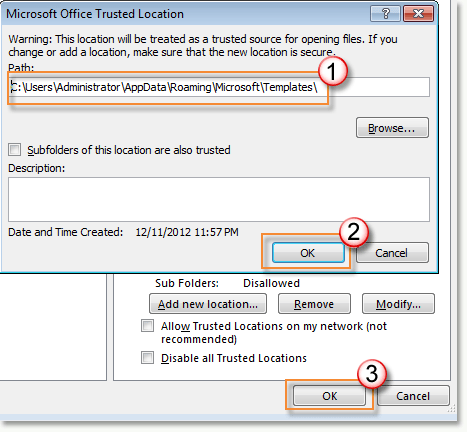
If you have blocked access to Microsoft Word file or any other MS Office document because you forgot your password, you can use the following ultimate tool to recover your original MS Word password.
Download MS Office Password Recovery Tool
Resume
This article explains what it is “Word experienced an error trying to open the file” error and how to fix it easily. These repair methods work in Microsoft Office 2003, 2007, 2010, 2013, 2016, 2019, Office 365 y Sharepoint.




