
Protected folder is the software that protects your privacy by allowing you to lock folders and files with a password.
Unlike BitLockerBitLocker is a full disk encryption tool developed by Microsoft, Available in professional and enterprise versions of the Windows operating system. Its main objective is to protect information stored on hard drives and removable drives through data encryption, so that only authorized users can access them. BitLocker uses advanced encryption algorithms and can integrate with the trusted platform module (TPM) to improve.... in Windows 10, this tool does not encrypt files. Instead, hides them from other people's eyes and viruses to prevent them from being modified or removed.
Hide files and folders from external eyes
If you share your computer with other people, whether they are family, friends or maybe coworkers, you should know that with this you are giving them access to your private information, as documents, Photos, videos or any files that are important to you.
This can be an obstacle to your privacy. And is that these people could snoop in your personal data and see things that are not their concern. Not only that, they could also accidentally remove your information or even steal it.
To prevent this from happening, iObit offers you its file protection tool Protected Folder. It is a program with which you can protect your most valuable files and folders with a password.
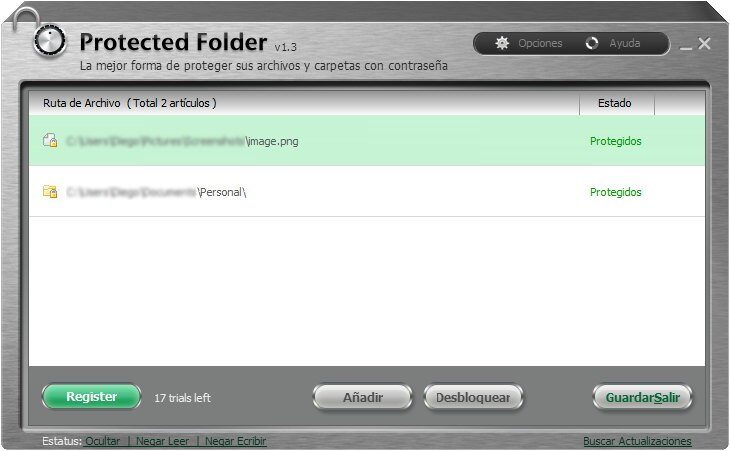
Thus, only you, who knows the master key, you will be able to access these files. No one else will be able to see, let alone modify your important files.
When you start the software, asks you create a master password that you should be able to remember. Here you can also enter a password hint so that you can easily remember it.
After that, iObit's protected folder enables you to drag folders or files that you want to lock. These will appear in a list as you add more files. From here you can view and unlock them at the time you decide.
By default, there are three lock options that are enabled: to hide (for the browser or other programs), deny read access (it can not be executed, copy, read) and deny write access (can not move, put off, Modify).
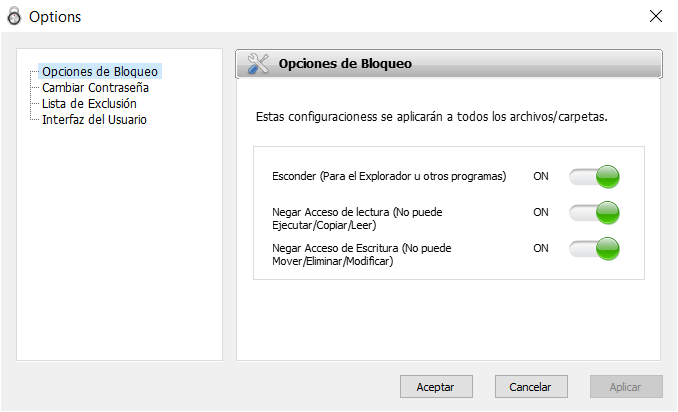
This means that your files will be protected even from ransomware attacks (that hijacks your files and asks for a ransom in exchange for releasing them) and other threats that exist today.
Please note that the free version only protects up to 20 files or folders. If you don't want to have this limitation, must buy the license.
Characteristics
- Password protect files and folders
- Determine password hint to be able to remember the password
- Hide files from explorer and other programs
- Protect your data from viruses, spyware y ransomware
- Prevent your files from being read, copy, modify, move or remove
- Does not encrypt files, he only hides them
Related




