
If so far none of the programs or websites that exist to download videos has convinced you, Youtube-dl GUI won't let you down.
Es un software para Windows y Linux que agrega una interfaz gráfica de usuario al popular programa de command lineThe command line is a textual interface that allows users to interact with the operating system using written commands.. Unlike graphical interfaces, where icons and menus are used, The command line provides direct and efficient access to various system functions. It is widely used by developers and system administrators to perform tasks such as file management, network configuration and.... Youtube-dl.
Thus, users who do not get along with the terminal will be able to download almost any video in a few clicks of the mouse.
Youtube GUI-dl: download audio and video from Youtube and hundreds of other sites
Even though today there are different programs to download YouTube videos, like 4K Download, many of these are paid. While free programs, like many websites, leave much to be desired and lack advanced features.
The GUI of Youtube-dl, on the other hand, is totally free and enables Download videos (WEBM, MP4) and audio (MP3, M4A, VORBIS) in batches from hundreds of sites, like Youtube, Bandcamp, BuzzFeed, CNN, Discovery, Flickr, Lynda, Mixcloud, MTV, Platzi, Reddit, Tele5, Twitch, Vimeo, adult pages, among others.
At the same time, you have a series of alternatives to add more download formats, change language (Spanish included), select audio quality, set subtitles, add additional commands and more.
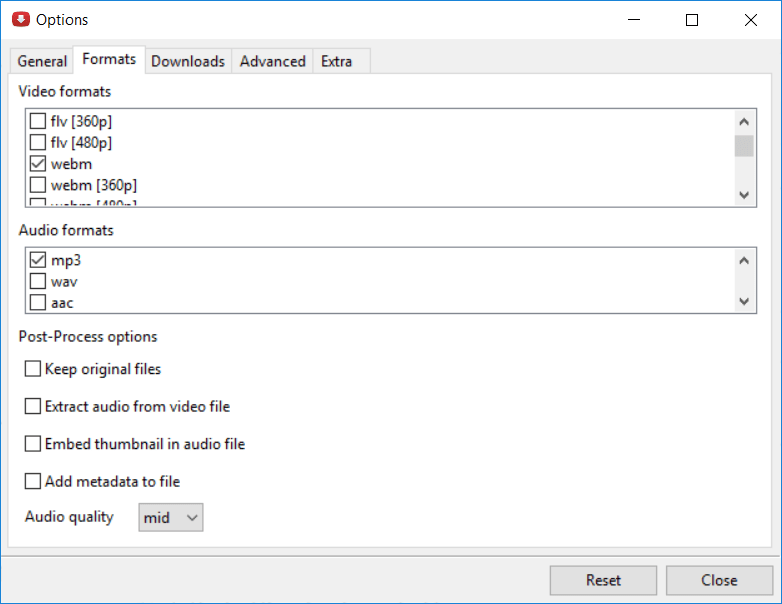
And if that was not enough, in the case of YouTube, not only makes it possible to download individual videos, but also:
- Channels
- Favorites
- Historical.
- Live Videos.
- Playlists.
- recommended.
- subscriptions.
- videos to watch later.
- and more.
Its operation in simple. After installing the app (for Windows there is also a portable version), you just have to copy video url (canal, live, YouTube playlist) in question, choose the location where the file will be saved, specify the format and add it to the download queue.
Then press the button “Start” and wait for the download to complete. At the same time, you can always pause or reload the download.
Undoubtedly, an application that -although it is not well known- a must on your PC to download any video from YouTube or other video site easily and quickly.
Related




