
Windows OEM Product Key Tool is a simple but very useful portable tool created for retrieve and display Windows OEM key stored in BIOS or EFI (Extendable firmware interface).
Unlike other similar apps, such as ProduKey or Win Keyfinder, OEMKey Tool only shows the BIOS OEM license, but not from windows registry.
At the same time, no installation required and no additional menus and functions.
OEMKey laptop
Previously, laptops and desktops included the Windows Certificate of Authenticity (COA), that it was nothing more than a sticker where the product key was displayed. Despite this, this changed with the arrival of Windows 8.
Nowadays, Computers include Windows Product Key in NVRAM (non-volatile random access memory) BIOS (basic entry system / exit) or EFI of your motherboard. This prevents it from getting lost, is forgotten or physically damaged, like tears or erased.
Thus, whether you have formatted or reinstalled Windows, you will have no problem retrieving the activation key.
And it is that this product key incorporated in the BIOS of your motherboard is not erased when you format or reinstall Windows, not even when you replace your hard drive.
But, How can I retrieve the OEM key from the BIOS? That's what the Windows OEM Product Key Tool is for 10.
Developed by NeoSmart, OEMKey shows you the OEM license for the following operating systems:
- Windows 10 Pro, Home and other editions, including RTM version.
- Windows 8 Y 8.1
- Windows 7.
To do this, just download Windows OEM Product Key Tool. Later, run OEM Key .exe and the program will display the product key in the main window.
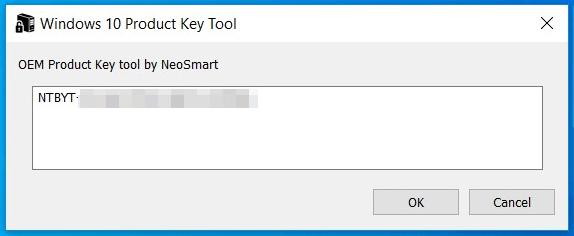
Since it is a portable tool, no installation needed. In addition, lacks menus, options or additional configuration panel, so any user can use it without any inconvenience and without the help of any external source.
Undoubtedly, one of the most useful and simple tools that exist and that you should download especially if you usually reinstall Windows or format your PC.
Also useful when buying a new PC or laptop. Well, as you know, manufacturers usually include bloatware and PUP in Windows installation. For this reason, when you buy a new computer, is better reinstall Windows to remove junk software.
By last, use the NeoSmart OEM Key Finder app to extract the original OEM key and legally reactivate Windows, without buying a new license.
Related




