
May update 2020 Windows 10 2004 (20H1) is the first major update to Microsoft's operating system from 2020, launched on 27 May this year.
Unlike its previous version (Windows 10 1909), this is a full update including feature enhancements to help you save time and maybe even be a source of fun.
News and changes
Just as features continually evolve in Windows 10, the service, Windows update and settings continue to improve with each update.
La nueva experiencia basada en chat de CortanaCortana is a virtual assistant developed by Microsoft, first released in 2014. Its name comes from a character from the popular Halo video game series.. Cortana uses artificial intelligence to help users perform various tasks, how to set reminders, answer questions and control smart devices. Although it was initially designed to integrate into operating systems such as Windows, Its functionality has been expanded to other platforms, like iOS... está aquí: Your personal productivity assistant now has an updated chat-based user interface where you can type or speak natural language requests to save time finding what you need and stay on track.
Stay on top of your numbers: Keep the calculator close; you can now choose to keep the Calculator app on top of everything.
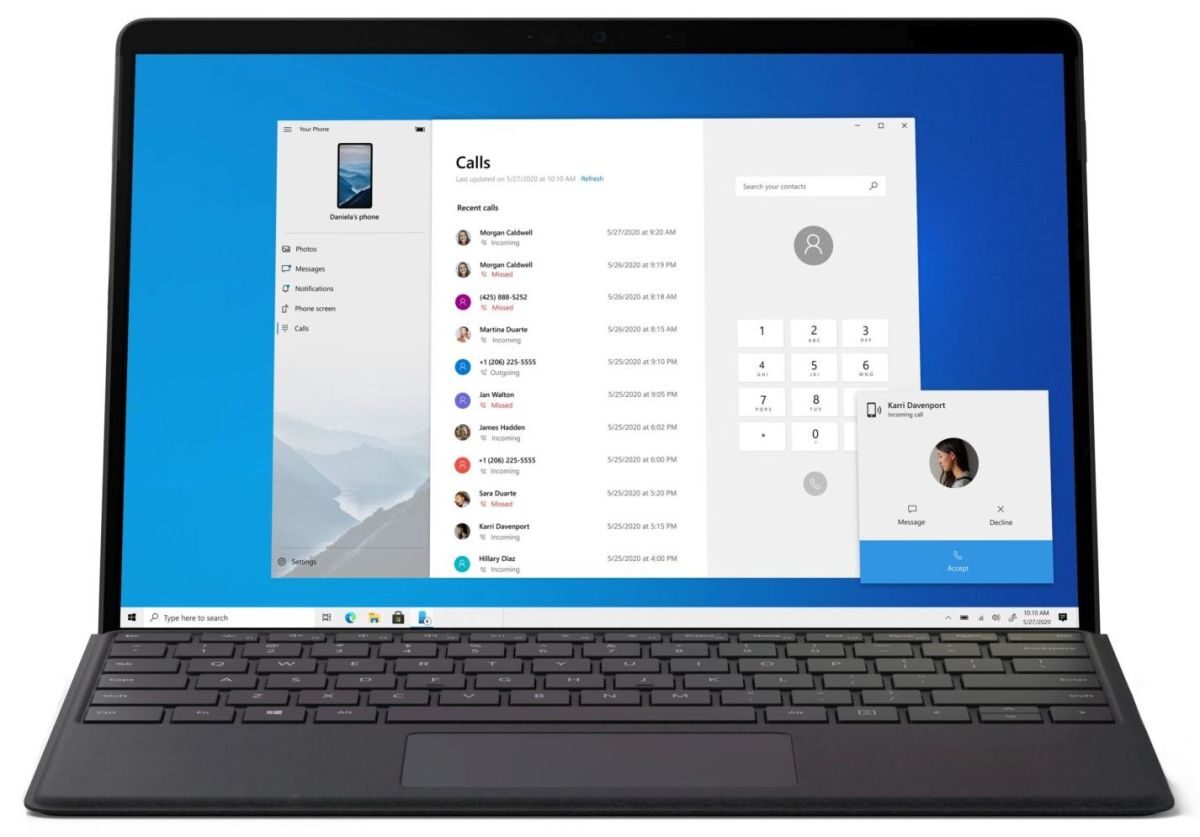
Bringing your smartphone and Windows PC closer together: The May Update 2020 brings the calling feature of the popular Your Phone app to ARM-compatible PCs from Microsoft and our OEM partners. Now you can do, receive or reply to text messages to your incoming phone calls directly on your PC without having your android mobile next to your PC. Thats not all, with the Your Phone app, you can stay in your flow by sending or receiving text messages, checking notifications and getting instant access to your android mobile photos and applications through your computer's big screen and keyboard. .
New to Notepad. The beloved text editor of 30 years has some small but powerful improvements. Now there is the option to search / replace, make zoomZoom is a video conferencing platform that has gained global popularity, especially during the COVID-19 pandemic. Founded in 2011, allows users to hold virtual meetings, webinars and online classes in a simple and accessible way. The application offers various functions, how to share screen, recording sessions and waiting rooms, which makes it a versatile tool for companies, educators and individuals. Its freemium model allows.... rápido en el texto, and when you see an asterisk in the title bar, will know you have unsaved changes.
Faster and easier connections: We make it easier and faster to pair your Bluetooth devices with your Windows compatible PC 10. Now you can take care of everything in Notifications (instead of Settings) with less steps.
Go without password: Did you know to boost security and a simple login experience, you can log in with your face, fingerprint or PIN? It's easier than ever to enable passwordless sign-in for your Microsoft accounts: simplemente vaya a Configuración> Cuentas> Opciones de inicio de sesión en su PC con Windows 10 and select 'Enabled’ in 'Make your device password free'. Please note this is hardware dependent.
More ლ ( ╹◡╹ L.): We bring fun by making more kaomoji available directly on the Windows emoji keyboard. To enter, you can use the shortcut, tecla de Windows + period key to enter (⌐ ■ _ ■).
Name your desks: Now, instead of “Desk 1” O “Desk 2”, you can give your virtual desktops more descriptive names, smart or funny. Use Virtual Desktop on Windows 10 enables you to expand your desktop beyond physical space limitations, organize groups of associated tasks and easily switch between them.
See games in an absolutely new light: New DirectX Features 12 Ultimate provide smoother graphics with greater detail, all without sacrificing frame rate.
Personalization and utility at your fingertips: Xbox Game Bar now supports third-party widgets, helping you customize the overlay experience to suit the way you play.
Storyteller News. Narrator sounds have been revamped and are now more functional and responsive. There is also a new command to summarize a web page and you will also hear some improvements in reading tables. At the same time, Narrator will automatically start reading web pages and emails (when opened in Outlook and Mail app).
End of support: 14 from December to 2021.
Related




