
WinSetupFromUSB It is a portable tool that, como YUMI Multiboot, allows you to create multi-boot USB drives with many Windows or GNU operating systems / Linux.
If you are looking for a tool that can do everything on a USB device to repair and rescue PC, WinSetupFromUSB is the right application for you.
Create a multiboot USB
Ever wonder how to install all versions of Windows from a single USB stick? Maybe you need to install Linux and Windows from the same USB drive? WinSetupFromUSB can do all of this for you.
Take ISO or IMG files from a range of operating systems and create multiple boot entries for them on a single USB drive. In case you have Windows PE with the same major version of Windows, you can assign custom names to the start input as per your choice.
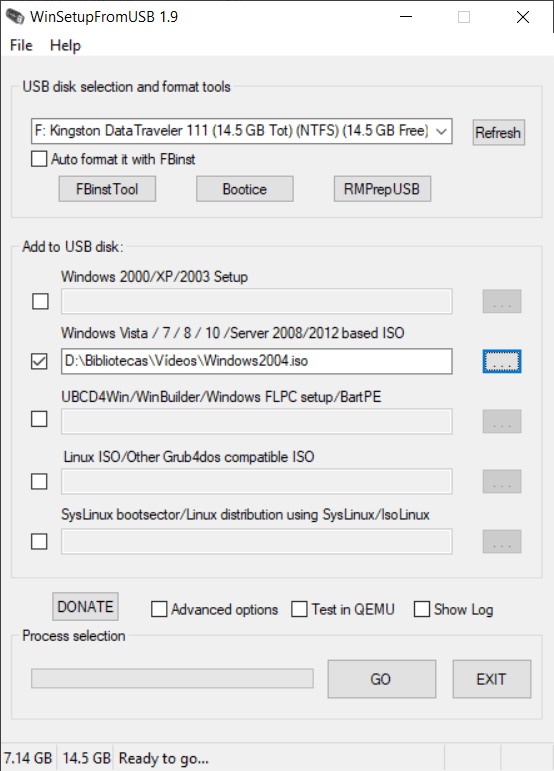
To start using the program, you need to choose the USB device or external hard drive first. Then indicate which operating system you want to install (Windows 2000, XP, 2003, Vista, 7, 8, 10, Server 2008, 2012, Linux distributions, etc.) and select the ISO from your PC.
WinSetupFromUSB will create a boot entry for each ISO you add, will verify them after they are copied to USB and notify you when the job is done.
Great compatibility with FileSystem
The latest version of WinSetupFromUSB supports almost all types of file systems in the initial stage. When you decide to make USB for UEFI, generally lose boot on BIOS or old legacy devices. But with the media created with this tool, the problem no longer exists.
You can format your disk to Fat32The FAT32 file system (File Allocation Table 32) It is an evolution of FAT16, developed by Microsoft in the 1990s 1990. It is widely used in storage devices such as USB flash drives and external hard drives due to its compatibility with multiple operating systems., including Windows, macOS and Linux. FAT32 allows managing volumes of up to 2 TB and files up to 4 GB, which makes it an option.. More and the software will create a bootloader that is compatible with computers with BIOS and UEFI. It sounds easy, truth?
Create USB with Windows, Linux, Android, rescue disk, cloning apps or all-in-one. Whether you want to put Windows or Linux or anything else, you just need to choose the ISO files for the desired operating systems.
If you have the same OS versions for different ISOs, you can have the option to rename them as per your choice. The tool has support for all file systems, either FAT32, NTFSThe NTFS (New Technology File System) is a file system developed by Microsoft for use on Windows operating systems. First introduced in 1993 con Windows NT, offers advanced features such as security permission management, error recovery and data compression. Unlike its predecessors, NTFS allows storage of large files and improves management efficiency.. More O exFATThe exFAT file system (Extended File Allocation Table) was developed by Microsoft and released in 2006. Designed for use on storage devices such as pen drives and SD cards, exFAT allows handling large files, exceeding the limit of 4 GB from its predecessor FAT32. What's more, is compatible with multiple operating systems, including Windows and macOS, making it easy to transfer files between different platforms. Its efficiency.... More. At the same time, all sector sizes other than 512bytes are supported when formatting USB. The tool can also initialize your USB if you don't know how to get started with the multiboot procedure..
Characteristics
- Multi-boot USB support
- Edit custom names for boot entries
- Any type of operating system can be included to boot on a single USB
- All file systems supported by a single application
- Portable and ad-free tool
- USB can be used in UEFI and BIOS enabled devices
- Soporta QEMU
- Live and persistence USB support for Linux distribution
- Multiple choices
Related




